[ UX/UI Design and Research · January 2026 - June 2026 ]
Redesigning the Mortgage
Broker Deal Interface
A practitioner-focused deal management application built to handle the full complexity of a mortgage application — from applicant intake to mortgage request — in a single, navigable workspace.
[ 01 — The Problem ]
Technical Debt & Poor UX/UI Design Practices
Mortgage brokers manage deals that span a wide web of information: multiple applicant details, employment histories, income sources, assets, liabilities, owned properties, and complex mortgage structures. The company's existing platform for collecting and reviewing this information had accrued considerable technical debt, contained major responsiveness issues, and strayed considerably from UX/UI design best practices. What's more, the design system across the larger platform had become fragmented and decentralized.
To unblock future feature enhancements, the business decided to modernize the tech stack of the entire platform. This overhaul was used as an opportunity to improve the overall UX/UI design of the deal management page in tandem. Stakeholder priorities included:
- Improving the fundamental UX/UI design of the deal entry page — including its responsiveness
- Improving the design of select high-priority features, identified as pain points during previous user interviews
- Formalizing a modern design system across the platform
- Maintaining the flow and density of fields throughout the page, as brokers emphasized that the existing application format was essential to their mental model
Constraints
- The mortgage industry imposes structure — Canadian mortgage applications have regulatory requirements (FINTRAC, CMHC guidelines, GDS/TDS qualification ratios) that must be surfaced in the interface.
- Previous attempts at redesigning the platform had been negatively received. Despite the agreed upon necessity of this new modernization project, stakeholders were apprehensive about change management. Usability testing carried extra weight for this reason.
- The form structure was largely determined by the application's existing workflow, not by designer/developer preferences.
- Base blue of the current design had to be maintained for brand consistency, despite accessibility (contrast) concerns.
[ 02 — Context & Users ]
Who Uses This
While the platform is used by a range of mortgage professionals, our focus was the mortgage broker — a domain expert who works with deal applications daily. They are not casual users. They know what every field means, and they expect the tool to keep up with them.
Cross-Cutting User Characteristics
Expert users who:
- Process multiple deals simultaneously and need to efficiently enter, review, and edit complex financial data.
- Within a single deal, context-switch consistently between applicant profiles, property data, and mortgage structures. Consequently, speed and data integrity matter more than visual simplicity.
- Operate under time pressure and work with financially sensitive data requiring accuracy.
[ 03 — User Personas ]
Who We're Designing For
Two distinct user profiles across the brokerage workflow:
Manages multiple concurrent active deals; may be mid-entry on 5–10 files at once.
Maximum density. All qualifying ratios visible at all times. Fast tab-key navigation. No modal interruptions during data entry.
Works on fewer deals, more methodically. Often assists a senior broker rather than running files independently.
Clear field labels and inline context. Confidence that required fields are complete before submission. Visible validation feedback.
[ 04 — Design Process ]
How the Design Evolved
The project used an iterative draft model. Drafts were deployed to a live URL after each iteration, allowing real feedback on a working prototype rather than static mockups.
Library Update
- Existing design translated from MUI V0/V1 to Mantine
- New component library applied, with focus on improving visual hierarchy, standardizing components across sections, and reducing UI noise
Navigation and Overview Panels
- Sidebar made collapsible across screen sizes to reduce cognitive load if desired and free real estate on smaller screens
- Deal overview bar moved to top of page to better reflect visual hierarchy
- Button grouping and styling adjusted to better reflect visual hierarchy of page
- Section banner made sticky to improve orientation within application; section headers synced with scroll
- Toggleable field legends (for improved scannability) moved to the sticky banner so they are accessible at all times
- Validation drawer brought in line (rather than overlapping) to improve field visibility while reviewing errors
- Co-applicant containers placed side by side where appropriate to optimise space
Field Layout and Responsiveness
- All fields aligned to 6–12 column grids
- Related fields grouped on same line when feasible
- Max width of child containers for fields adjusted to improve readability and align with best practices
- Max width of parent containers for fields defined to improve readability on larger screen sizes
- Card and field stacking established on smaller screen sizes
- Simplified state for deal overview and financial overview bars on mobile
- Mobile state for validation drawer, as well as validate and create buttons
[ 05 — Key Design Decisions ]
Decisions & Rationale
Fixed header + scrollable content area
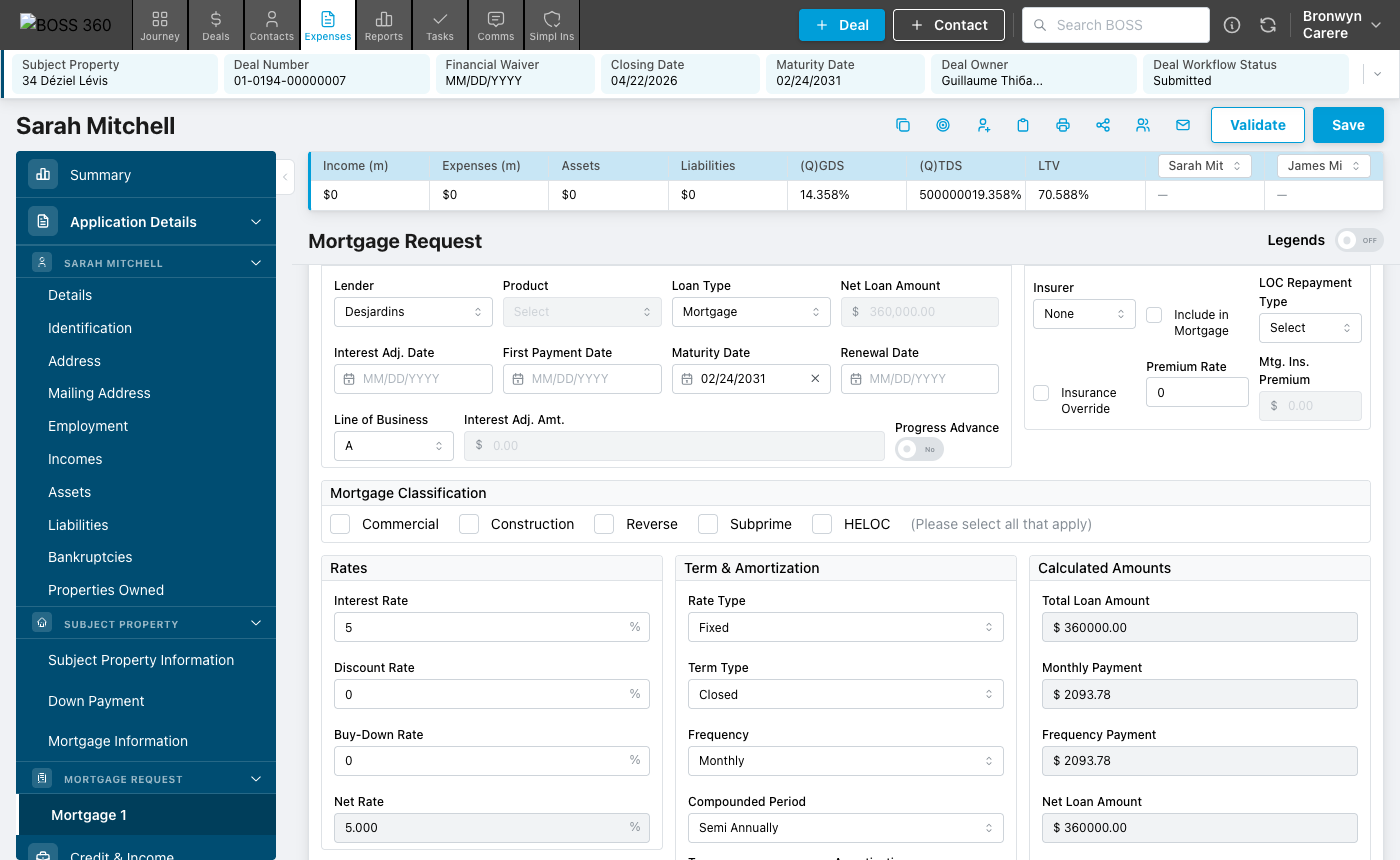
The deal summary, financial metrics bar, and section banner stay fixed while the user scrolls. Brokers never lose context on which deal they're in or what the key ratios are.
Scroll-synced sidebar navigation
The sidebar highlights the active section as the user scrolls, not just when they click. Real-time position sense in a long document — critical when a deal has 14 sections.
Always-visible financial metrics
GDS, TDS, LTV, income, assets, and liabilities visible at all times in the financial bar. Brokers need these ratios in view while editing any section.
Multi-pair side-by-side layout
The deal supports N applicant pairs, each with an optional co-applicant. Within each pair, primary and co-applicant panels render side by side. "Add Co-Applicant" and "Add Applicant Pair" are distinct buttons to prevent ambiguity.
xs form controls throughout
All form inputs use Mantine's smallest size (xs) and a three-tier button hierarchy. Dense enough to show substantial data without scrolling, while preserving legibility.
Container queries over viewport queries
CSS container queries so field wrapping fires relative to card width. Essential: when the validation panel opens, the form width changes — viewport queries wouldn't respond.
Validation drawer with pill-mode cycle
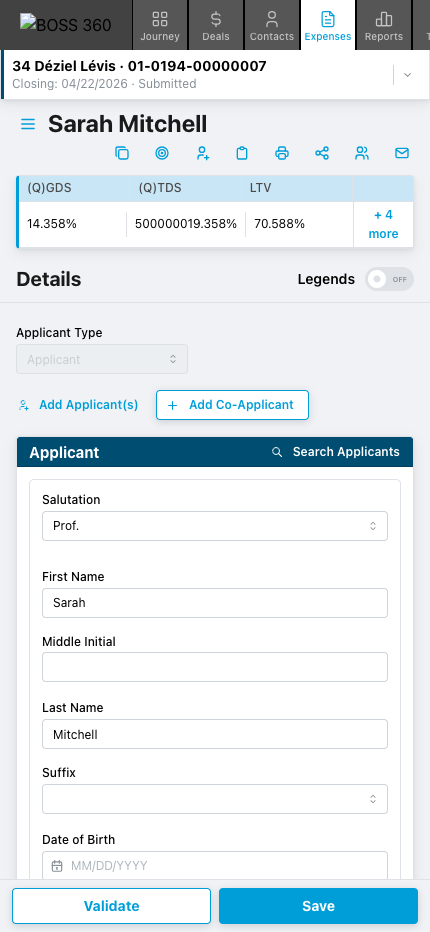
On mobile, validation results in a bottom Mantine Drawer. When collapsed, a fixed pill shows error/warning counts and a "Next →" button cycles through all items without reopening the full drawer.
Single-row liability entries
Usability testing showed brokers with 10–20 liabilities need to see as many rows as possible simultaneously to assess payoff combinations. All 7 liability fields fit on one line per entry, maximising rows-per-viewport in the most debt-heavy section.
Two-level drawer stack with search
On tablet and mobile, the hamburger opens a two-level drawer stack. The first lists all navigation modules. Tapping a module opens a second drawer with autofocus search, pinned items, and a contextual action button fixed to the bottom.
[ 06 — The Interface ]
Key Screens
Full Application View
The complete deal workspace: deal header, financial metrics bar, sidebar navigation, and the 14-section form. All key metrics visible above the fold.
Sticky Banner & Financial Metrics Bar
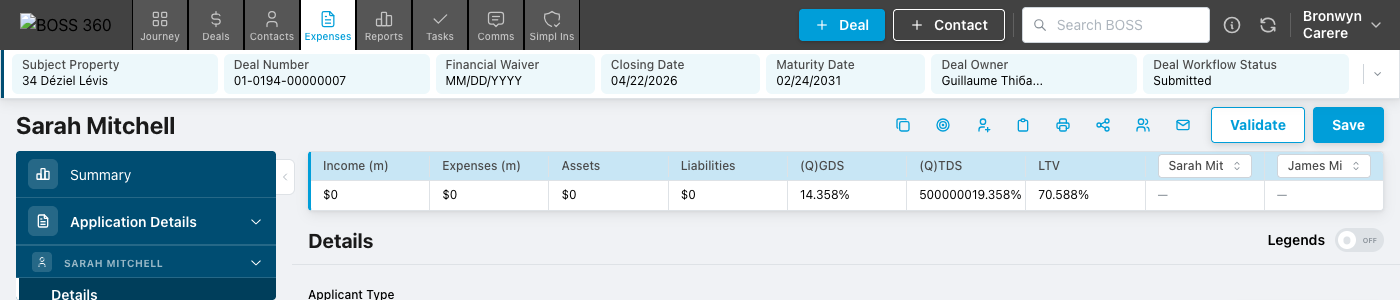
As the user scrolls, the sticky banner updates to show the current section name. The financial bar remains anchored, keeping qualifying ratios always in view.
Sidebar Navigation
Three-level hierarchy: top-level areas, collapsible groups, and leaf items. Active leaf highlighted with scroll syncing — position tracked without user interaction.
Deal Header
A columnar summary of the current deal. A chevron expands a list of other deals for quick switching without leaving the form.

Details Section — Two-Column Applicant Layout
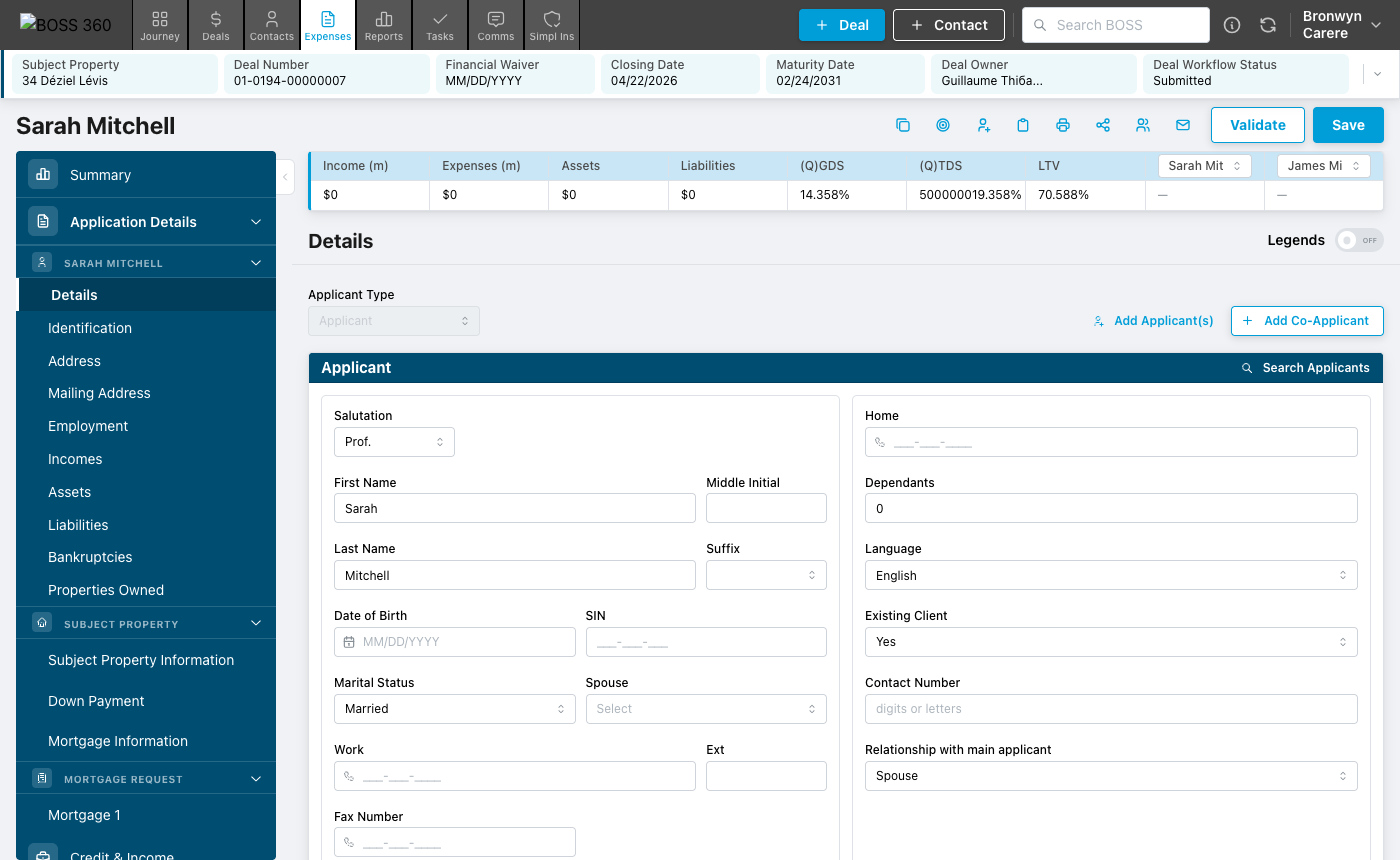
The most complex section: two applicant panels side by side, each with a 12-column field grid. A Legends toggle surfaces field-level approval context.
Mortgage Request
The most field-dense section. Rate details in a three-column layout (rates / term structure / computed outputs) with real-time net rate calculation.
Mobile View
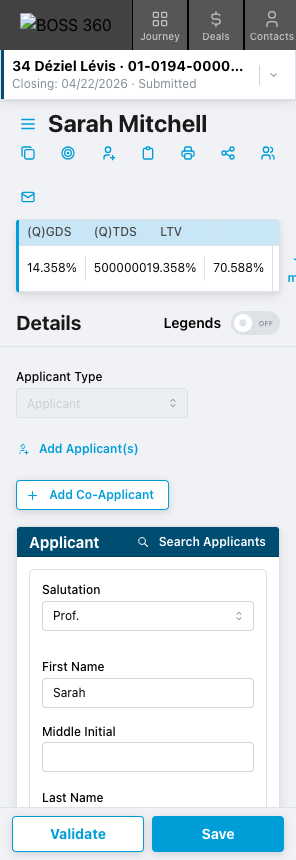
Multi-column field groups collapse to single-column via container queries. The sidebar becomes a hamburger drawer. Validation results appear in a bottom Mantine Drawer.
[ 07 — Usability Testing ]
Testing & Findings
Five moderated remote usability sessions conducted with existing broker clients. Each ~60 minutes using a task-based think-aloud protocol.
Participants
| Code |
|---|
| EN1 |
| EN2 |
| EN3 |
| FR1 |
| FR2 |
Test Tasks
All four tasks were completed successfully by all five participants. Key observations are noted below.
| # | Task |
|---|---|
| 1 | Create Applicant |
| 2 | Add Co-Applicant |
| 3 | Search Applicants |
| 4 | Validate |
Key Findings
Finding 1 — Redesign accepted without disruption. All five participants called the new page an improvement. Nobody was blocked or disoriented. Bolder section sub-headers were singled out as making the page easier to scan. The deal overview and financial bar split, and the collapsible deal navigation, were understood by all without explanation.
Finding 2 — Information density is a real constraint for review workflows. Three of five participants want more content per screen. Pain is most acute in Liabilities, where a refinance with 10–20 debts forces extensive scrolling. FR1's second-monitor document-review workflow is directly degraded by the side-by-side layout once both applicants are entered — a tension between entry (better side-by-side) and review (better full-width stacked).
Finding 3 — Live validation behaviour needs a stronger visual signal. Two participants (FR1 and EN1) continued to hit "Validate" after each correction, not realising the list was already updating live. The auto-clearing behaviour was noticed and praised by EN2 and EN3, but the corrected-state styling was not prominent enough to break the existing mental model.
Quotes from Participants
"The visual effects of the boxes, I think, is more prominent, so you can see that you're in a different section where I feel like in the current Boss version, it kind of melds all together. So that's nice."
"Oh, I like this. Good job — whose idea was this?… The fact that these are side by side, so I know that my left is my applicant one and my right is applicant two, is nice."
"That's a nice improvement to have them cross off the list and to keep them all here to be able to click through them… Big improvement."
"Personally, I would prefer to be able to see employment one in a full page like that. Because when I review my deal, I don't want to scroll down. What I do, I will open the documents on my other screen and I want to confirm the information on my left screen."
[ 08 — Outcomes ]
Results & Impact
The prototype was deployed to a live Vercel URL and shared with named users via token-based auth. Results captured from five moderated sessions.
What Worked Well
- Bolder, more distinct section headers reduced the "sections meld together" confusion reported with current BOSS
- Side-by-side co-applicant layout praised by 4/5 participants for data-entry workflows — makes applicant columns visually clear during phone calls with clients
- Live-updating validation (errors crossing off without re-triggering) described as "a nice feature" and "way better" by those who noticed it
- Validation panel no longer covers the form fields it refers to — EN1 called this out as a meaningful, specific improvement over current BOSS
- Click-through-to-error in the validation drawer was instantly understood by all five participants
- Collapsible deal overview navigation understood by all without explanation
- Save/Validate button position swap went unnoticed — nobody was disrupted
- Financial waiver placement in the deal header praised by EN1 as reducing the risk of agents missing it
What Needs More Work
- → Live validation auto-clear signal needs stronger visual treatment — 2/5 participants missed it and continued re-validating manually (addressed in Draft 19: more prominent corrected-state styling)
- → Address lookup fails on unit-number-first format (e.g. "Unit 49, 1760 Copperhead Drive") — existing BOSS bug, not a redesign regression, but frequently encountered
- → Search Applicants button not immediately visible on first scan for 2/5 participants — further discoverability investigation warranted
- → Fax number and Address Line 2 fields flagged as obsolete candidates for removal or de-emphasis
- → Missing ID types in Identification section: Provincial ID card and PAL (firearms licence) are requested frequently in certain regions
[ 09 — Iterations from Testing ]
What Changed After Testing
Design decisions updated in response to usability findings. Each entry connects a finding to a specific change.
Single-row liability entries + global padding tightening
Finding: 3/5 participants wanted more rows visible per screen, most acutely in Liabilities (10–20 entries). Change: All 7 liability fields collapsed onto one line per entry, margins and padding tightened globally. Outcome: Refinance deals with 10+ debts now expose significantly more rows per viewport.
Review mode toggle in multi-entry sections
Finding: FR1's document-review workflow (source doc on second monitor, form on left) degraded once both applicants were visible side-by-side. Change: A "Review" switch strips form styling to show data only in a compact, scannable layout. Outcome: Entry users keep side-by-side; review users can switch to full-width read-only view.
Prominent corrected-state styling in validation drawer
Finding: FR1 and EN1 continued to re-trigger validation manually after each correction, not noticing validated items were already clearing live. Change: The "corrected" state made visually distinct — strikethrough text + green check icon. Outcome: Auto-clearing now reads as a visible state transition, reducing redundant re-validation clicks.
[ 10 — Next Steps ]
What Comes Next
The current prototype covers the full UI surface with mock data. The next phase will introduce real system integration and close remaining design gaps.
- Re-test the design — specifically the Review mode toggle for scannability and the improved corrected-state styling for live validation clarity
- Resolve the side-by-side vs. stacked tension for document-review workflows — consider a user-level preference or section-level toggle
- Group participants by user type for future usability rounds — test within cohorts (e.g. high-volume entry-only vs. team-lead reviewers) for cleaner findings